
 Battlefield 6 is one of the toughest games to run in 2026. Before you go ahead and buy or download it, you should first check if your PC can actually run it. EA has laid out clear minimum and recommended specs for the game, and you’ll need Windows 11 with Secure Boot and TPM 2.0 enabled. This guide goes through each hardware tier so you have a clear idea of what to expect before you start the game for the first time.
Minimum System Requirements
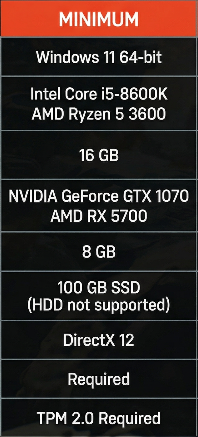
These are the minimum specs that EA officially supports. The game will start and work, but don’t count on it running smoothly.
- OS: Windows 11 64-bit
- CPU: Intel Core i5-8600K or AMD Ryzen 5 3600
- RAM: 16 GB
- GPU: NVIDIA GeForce GTX 1070 or AMD RX 5700
- VRAM: 8 GB
- Storage: 100 GB SSD (HDD not supported)
- DirectX: DirectX 12
- Secure Boot: Required
- TPM: TPM 2.0 Required
 At the lowest settings, you can usually get 720p or a low 1080p resolution running around 30 to 45 FPS on Low settings. Large maps like in Conquest mode can cause noticeable frame drops, especially when there are big explosions or heavy firefights happening. Multiplayer works, but it can be pretty frustrating to deal with. You’ll probably notice some stutters when new areas load in. You can get through this fine in casual play, but ranked competitive matches will definitely feel tough.
Recommended System Requirements
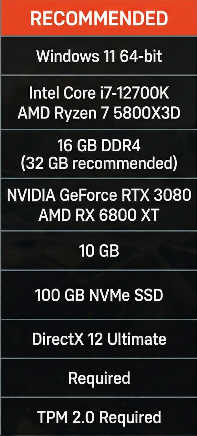
This is the perfect spot EA had in mind when they built the game. Most players should try to reach this tier.
- OS: Windows 11 64-bit
- CPU: Intel Core i7-12700K or AMD Ryzen 7 5800X3D
- RAM: 16 GB DDR4 (32 GB recommended)
- GPU: NVIDIA GeForce RTX 3080 or AMD RX 6800 XT
- VRAM: 10 GB
- Storage: 100 GB NVMe SSD
- DirectX: DirectX 12 Ultimate
- Secure Boot: Required
- TPM: TPM 2.0 Required
 If your system meets the recommended specs, you should be able to play Battlefield 6 at 1080p on High settings and get a smooth 60 to 90 FPS in most cases. You’ll see clear visuals, decent draw distance, and steady performance when playing regular multiplayer modes. Frame drops still happen during the busiest 64-player moments, but they’re brief and don’t really mess things up. Most competitive players use this setup for ranked play.
Ultra / High-End Requirements
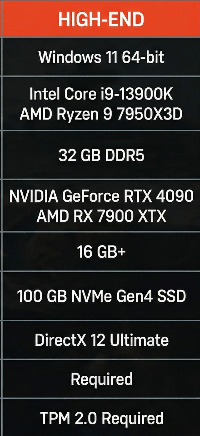
If you want to get the best visual performance out of the game, this is the hardware level you should go for.
- OS: Windows 11 64-bit
- CPU: Intel Core i9-13900K or AMD Ryzen 9 7950X3D
- RAM: 32 GB DDR5
- GPU: NVIDIA GeForce RTX 4090 or AMD RX 7900 XTX
- VRAM: 16 GB+
- Storage: 100 GB NVMe Gen4 SSD
- DirectX: DirectX 12 Ultimate
- Secure Boot: Required
- TPM: TPM 2.0 Required
 At this stage, the game feels like a whole different experience. You can play 4K with Ultra settings and rt on, and still keep your FPS above 100 without much trouble. Path tracing, volumetric destruction lighting, and full ambient occlusion all run smoothly without slowing performance down. If you stream or record gameplay, this tier can manage it without dropping any frames. This is the only tier where turning on all DLSS or FSR quality settings actually gives you cinematic results without any trade-offs.
Ray Tracing Requirements
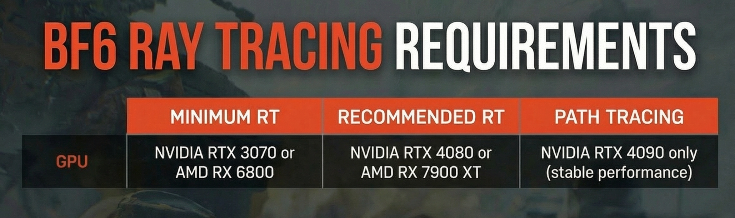
Battlefield 6 includes full ray tracing that takes care of reflections, shadows, and ambient occlusion. It’s not required, but it definitely makes the game look way better.
- Minimum for Ray Tracing: NVIDIA RTX 3070 or AMD RX 6800
- Recommended for Ray Tracing: NVIDIA RTX 4080 or AMD RX 7900 XT
- Path Tracing (Full RT): NVIDIA RTX 4090 only (stable performance)
 If you turn on ray tracing with an RTX 3070, you’ll probably see your FPS drop to about 50 to 60 at 1080p on Medium settings. You can play it, but you’ll want to set DLSS to Performance mode to get your frame rate back. With an RTX 4080, you can run ray tracing at 1440p on High settings and still get a smooth 80 to 100 FPS, all without having to rely on heavy upscaling. Path tracing is mostly useful for screenshots and cinematic scenes because even the RTX 4090 can’t keep 60 FPS when full path tracing is on during big multiplayer games.
DLSS, FSR & XeSS Support
Battlefield 6 supports all three major upscaling technologies. This matters because it allows the game to run on hardware that might usually have a hard time with it.
- NVIDIA DLSS 3.5: Supported — Frame Generation is now available for RTX 40 series
- AMD FSR 3.1: Supported — works with any GPU, not only AMD cards
- Intel XeSS 2.0: Supported — works best with Intel Arc GPUs
 Using DLSS Quality mode on an RTX 3080 at 1440p can bring back almost 40% of the frames you might lose, and you won’t really notice any drop in image quality. If you have an AMD GPU and are having trouble, try FSR 3.1 Balanced mode — it strikes a good middle ground. Frame Generation on RTX 40 series cards really changes things up — it can double your frame rate when your GPU is working hard. However, Frame Generation adds a bit of input lag, so most competitive players keep it off during ranked matches and only switch it on when playing casually.
Storage & Installation Notes
 SSD is mandatory. EA has officially removed HDD support for Battlefield 6. The game has a new streaming asset system that loads map data on the fly as you explore the environments. On an HDD, this would lead to constant stutters and pop-in that make the game hard to play. A regular SATA SSD will meet the basic needs, but going with an NVMe SSD will make maps load faster and levels run more smoothly. If you’ve got a Gen4 NVMe drive, the map loads almost instantly the first time.
- Installation size: ~95–100 GB at launch
- Expected size after patches: 110–120 GB
- Minimum storage type: SATA SSD
- Recommended storage type: NVMe SSD (Gen3 or Gen4)
Windows 11 & Security Requirements
 Windows 10 is not supported. Battlefield 6 only works on Windows 11 and won’t start on Windows 10, no matter how powerful your PC is. The game also needs Secure Boot and TPM 2.0 turned on in your BIOS. This is a part of EA Anti-Cheat’s kernel-level protection system. If you try to start the game without turning these on, you’ll see an error message before the main menu even shows up.
- Required OS: Windows 11 64-bit (any version)
- Secure Boot: Must be enabled in BIOS
- TPM: TPM 2.0 must be active
- DirectX: DirectX 12 or DirectX 12 Ultimate
Most PCs made after 2021 already meet these requirements. If you upgraded your PC from Windows 10 to Windows 11, make sure Secure Boot is turned on in your BIOS — sometimes Windows 11 installs without it, but Battlefield 6 will notice and won’t let you start the game.
Console Versions
You can also play Battlefield 6 on PlayStation 5 and Xbox Series X|S. Console players don’t have to stress about any of those requirements — the game is ready to go and runs smoothly on each platform from the start.
- PlayStation 5: 60 FPS at 1440p in Performance Mode, 30 FPS at 4K in Quality Mode
- Xbox Series X: 60 FPS at 1440p in Performance Mode, 4K/30 FPS in Quality Mode
- Xbox Series S: 60 FPS at 1080p, no 4K support
- PS4 / Xbox One: Not supported
Console performance is about the same as a mid-range PC gaming setup from the recommended tier. You usually get a steady 60 FPS in most modes, but the PC version still looks better on Ultra settings because it uses higher resolution textures and ray tracing features that consoles just can’t fully handle.
